Redux
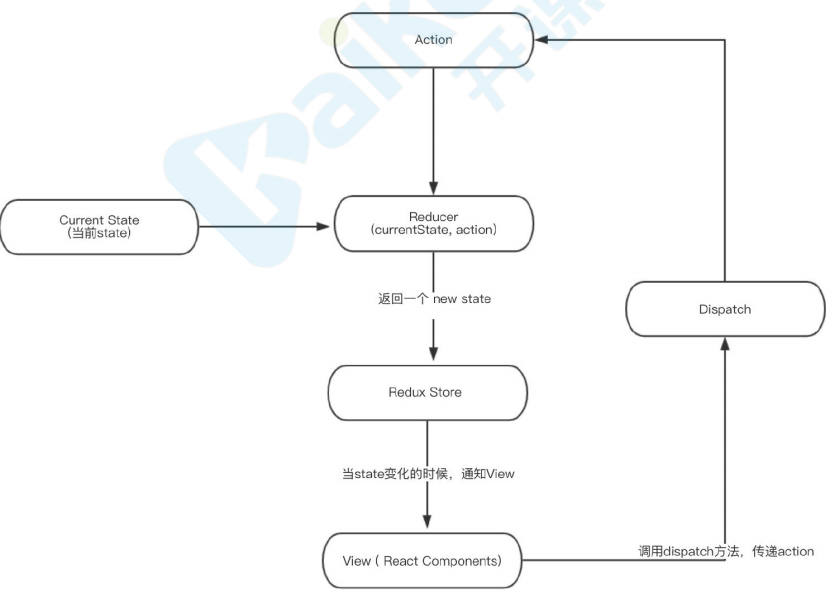
Redux,JavaScript应⽤的状态容器,提供可预测化的状态管理,它保证程序⾏为⼀致性且易于测试 Redux,是负责组织 state 的⼯具,但你也要考虑它是否适合你的情况,不要因为有⼈告诉你要⽤ Redux 就去⽤,花点时间好好想想使⽤了 Redux 会带来的好处或坏处
适合场景
- 有着相当⼤量的、随时间变化的数据
- state 需要有⼀个单⼀可靠数据来源
- 把所有 state 放在最顶层组件中已经⽆法满⾜需要了
- 某个组件的状态需要共享
安装
yarn add redux
基本配置步骤
- createStore 创建 store
- reducer 初始化、修改状态函数和修改规则
- getState 获取状态值
- dispatch 提交一个 action 根据规则修改数据
- subscribe 变更订阅
累加器举例
-
- 需要⼀个store来存储数据
-
- store⾥的reducer初始化state并定义state修改规则
-
- 通过dispatch⼀个action来提交对数据的修改
-
- action提交到reducer函数⾥,根据传⼊的action的type,返回新的state
-
- subscibe 订阅更新数据
创建 store
// src/store/index.js
import { createStore } from 'redux'
// reducer初始化、修改状态函数
const countReducer = (state=0, action) => {
 switch (action.type) {
  case 'ADD':
   return state + 1
  case 'MINUS':
   return state - 1
  default:
   return state
 }
}
const store = createStore(countReducer)

export default store
页面使用
// src/views/Home.js
import React, { Component } from 'react'
import Layout from '../../components/Layout'
import store from '../../store'
console.log(store, 'store')

class Home extends Component {
  componentDidMount() {
  // subscibe 订阅更新数据
    store.subscribe(() => {
      console.log('subscribe')
      console.log(this)
      this.forceUpdate()
    })
  }
  add = () => {
  // 提交修改规则
    store.dispatch({ type: 'ADD' })
  }
  minus = () => {
    store.dispatch({ type: 'MINUS' })
  }
  render() {
  // getState 获取状态值
  const count = store.getState()
    return (
      <div>
        <Layout title='home page' showtopbar={true} showbottombar={true}>
          <div>home page</div>
          <div>count值: { count }</div>
          <div>
            <button onClick={ this.add }>点击递加</button>
            <button onClick={ this.minus }>点击递减</button>
          </div>
        </Layout>
      </div>
    )
  }
}

export default Home