State & 生命周期
正确使用 setState
setState(partialState, callback)
| 参数 | 说明 |
|---|---|
| partialState | ⽤于产⽣与当前state合并的⼦集(object或function(state, props)) |
| callback | state更新之后被调⽤(function) |
关于 setState 应该了解三件事
- 1 不要直接修改 State,否则不会重新渲染组件,应该使用 setState
// 错误
this.state.userinfo.username = 'askaxu'
// 正确
this.setState({
 userinfo: {
  username: 'askaxu'
 }
})
- 2 state 的更新可能是异步的 出于性能考虑,React 可能会把多个 setState() 调⽤合并成⼀个调⽤, setState只有在合成事件和⽣命周期函数中是异步的, 在原⽣事件和setTimeout中都是同步的,这⾥的异步其实是批量更新
获取 state 最新状态值有以下⽅式
- 1 在 setState(partialState, callback)的回调中获取最新的状态值
- 2 使用定时器 setTimeout(() => { .... }, 0)
- 3 在 componentDidMount 中使用 原生事件
import React, { Component } from 'react'

class SetStatePage extends Component {
  constructor(props) {
    super(props)
    this.state = {
      userinfo: {
        username: 'sunsboyxu'
      },
      count: 0
    }
  }

  changeUsername = () => {
    console.log(this)
    this.setState({
      userinfo: {
        username: 'askaxu'
      }
    })
  }

  changeValue = val => {
    this.setState({
      count: this.state.count + val
    }, () => {
      // 测试第二步
      console.log('测试第二步,回调中获取状态值')
      console.log('count:', this.state.count)
    })
  }

  setCount = () => {
    // 测试第一步
    this.changeValue(1)
    // this.changeValue(2)
    // 打印 count ,发现还是上次的值,可以在 setState(partialState, callback)的回调中获取最新的状态值
    console.log('测试第一步')
    console.log('获取状态值')
    console.log('count:', this.state.count)
  }

  setCount2 = () => {
    setTimeout(() => {
      this.changeValue(1)
      console.log('测试第三步')
      console.log('count:', this.state.count)
    }, 0)
  }

  componentDidMount() {
    document.querySelector('#btn-count').addEventListener('click', () => {
      console.log('测试第四步,原生事件处理')
      this.setCount()
    }, false)
  }

  // 事件被合并
  changeValue3 = val => {
    this.setState({
      count: this.state.count + val
    })
  }

  setCount3 = () => {
    // 只会执行加2 的操作
    this.changeValue3(1)
    this.changeValue3(2)
  }

  // 如果想要链式更新 state
  changeValue4 = val => {
    console.log('链式更新的val:' + val)
    this.setState((state) => ({count: state.count + val}))
  }
  setCount4 = () => {
    // 支持同时加1,并且加2 的操作
    this.changeValue4(1)
    this.changeValue4(2)
  }

  render() {
    const { userinfo, count } = this.state
    return (
      <div>
        <h4>正确使用 setState</h4>
        <p>{userinfo.username}</p>
        <div>
          <button onClick={() => this.changeUsername()}>修改 state</button>
        </div>
        <h4>Count: <span>{count}</span></h4>
        <div>
          <button onClick={this.setCount}>修改 count 1</button>
          <button onClick={this.setCount2}>修改 count-使用setTimeout</button>
          <button id='btn-count'>原生事件修改 count</button>
          <button onClick={this.setCount3}>事件被合并</button>
          <button onClick={this.setCount4}>链式更新 state</button>
        </div>
      </div>
    )
  }
}

export default SetStatePage
- 3 state 的更新会被合并 在某个事件上,同时调用多个 setState 时,状态值的更新会被合并, 执行 setState时,第一个参数使用 函数来触发链式的更新
// 链式更新 state
  changeValue4 = val => {
    console.log('链式更新的val:' + val)
    this.setState((state, props) => ({count: state.count + val}))
  }
  setCount4 = () => {
    // 支持同时加1,并且加2 的操作
    this.changeValue4(1)
    this.changeValue4(2)
  }
生命周期
⽣命周期⽅法,⽤于在组件不同阶段执⾏⾃定义功能。 在组件被创建并插⼊到 DOM 时(即挂载中阶段(mounting)), 组件更新时,组件取消挂载或从 DOM 中删除时,都有可以使⽤的⽣命周期⽅法
- UNSAFE_componentWillMount
- UNSAFE_componentWillUpdate
- UNSAFE_componentWillUnMount
- componentDidMount() {} // 组件挂载
- shouldComponentUpdate(props, state) {
  // 控制组件是否更新,需要 返回 true/false
  return true
 }
- componentDidUpdate() {} // 组件更新
- componentReciveProps(nextProps) {
  // 初次渲染不会执行,只有在已挂载的组件接收新的props时才会执行
 }
- componentUnMount() {}
v16.3之前的⽣命周期
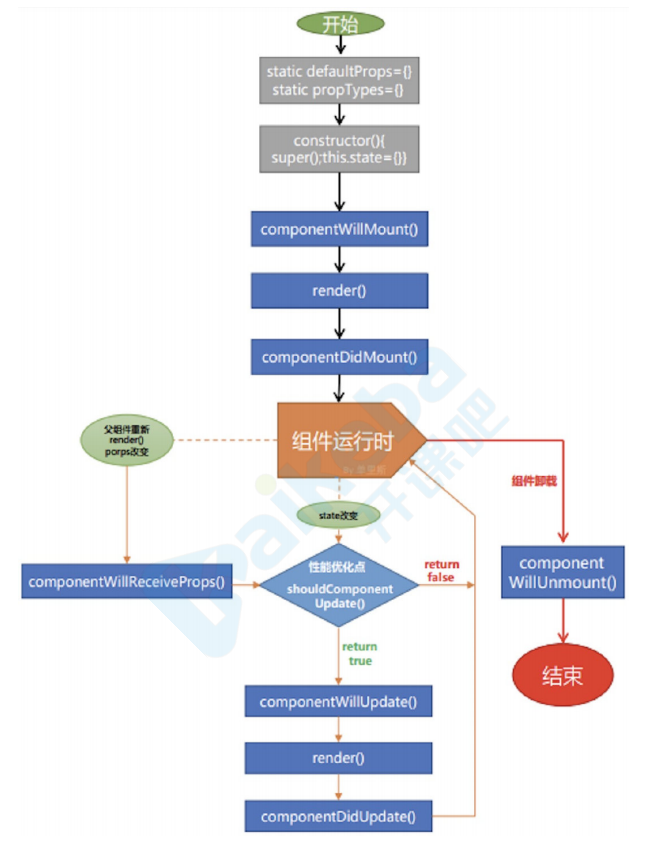
v16.4之后的⽣命周期
v17可能会废弃的三个⽣命周期
V17可能会废弃的三个⽣命周期函数⽤ getDerivedStateFromProps 替代,⽬前使⽤的话加上 UNSAFE_
- componentWillMount
- componentWillReceiveProps
- componentWillUpdate
UNSAFE_componentWillMount() {
 console.log('componentWillMount--')
}
如果不想⼿动给将要废弃的⽣命周期添加 UNSAFE_ 前缀,可以⽤下⾯的命令
npx react-codemod rename-unsafe-lifecycles <path>
新增2个生命周期
- static getDerivedStateFromProps
- getSnapshotBeforeUpdate
getDerivedStateFromProps
static getDerivedStateFromProps(props, state) {
 console.log('父组件getDerivedStateFromProps--')
 console.log('props', props)
 console.log('state', state)
 const { count } = state
 return count > 10 ? { count: 0 } : null
}
- 在调⽤ render ⽅法之前调⽤
- 在初始挂载及后续更新时都会被调⽤
- 它应返回⼀个对象来更新 state,如果返回 null 则不更新任何内容
请注意,不管原因是什么,都会在每次渲染前触发此⽅法 这与 UNSAFE_componentWillReceiveProps 形成对⽐,后者仅在⽗组件重新渲染时触发,⽽不是在内部调⽤ setState 时
getSnapShotBeforeUpdate
getSnapShotBeforeUpdate(preProps, preState) { }
在 render 之后,componentDidUpdate 之前, getSnapshotBeforeUpdate() 在最近⼀次渲染输出(提交到 DOM 节点)之前调⽤ 它使得组件能在发⽣更改之前从 DOM 中捕获⼀些信息(例如,滚动位置) 此⽣命周期的任何返回值将作为参数传递给 componentDidUpdate(prevProps, prevState, snapshot)